




English | [įŽ€äŊ“中文](README_zh-CN.md) PDF2ZH

PDFMathTranslate

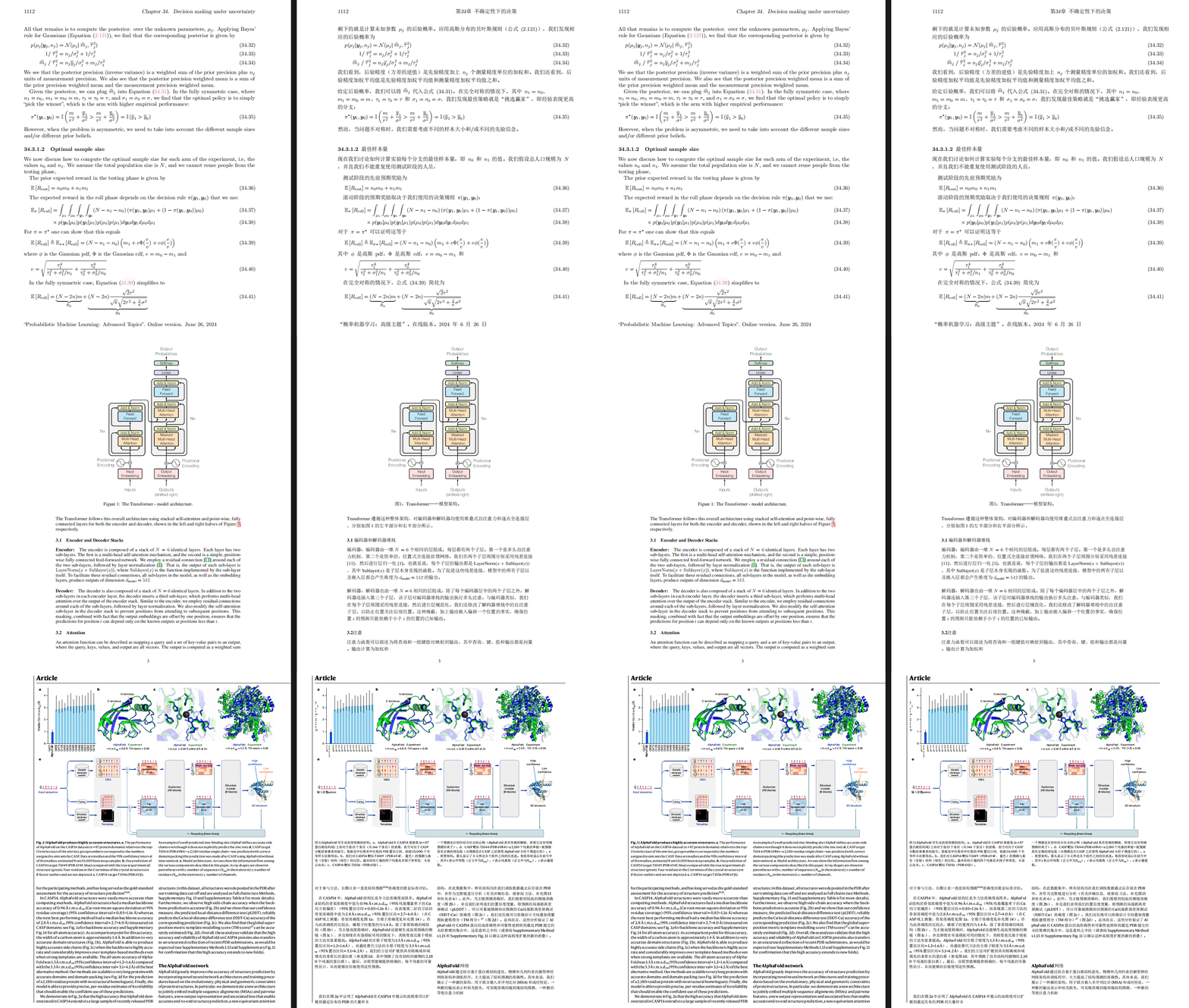
PDF scientific paper translation and bilingual comparison. - 📊 Preserve formulas, charts, table of contents, and annotations *([preview](#preview))*. - 🌐 Support [multiple languages](#language), and diverse [translation services](#services). - 🤖 Provides [commandline tool](#usage), [interactive user interface](#gui), and [Docker](#docker) Feel free to provide feedback in [GitHub Issues](https://github.com/Byaidu/PDFMathTranslate/issues) or [Telegram Group](https://t.me/+Z9_SgnxmsmA5NzBl).

Updates

- [Nov. 26 2024] CLI now supports online file(s) *(by [@reycn](https://github.com/reycn))* - [Nov. 24 2024] [ONNX](https://github.com/onnx/onnx) support to reduce dependency sizes *(by [@Wybxc](https://github.com/Wybxc))* - [Nov. 23 2024] 🌟 [Public Service](#demo) online! *(by [@Byaidu](https://github.com/Byaidu))* - [Nov. 23 2024] Firewall for preventing web bots *(by [@Byaidu](https://github.com/Byaidu))* - [Nov. 22 2024] GUI now supports Italian, and has been improved *(by [@Byaidu](https://github.com/Byaidu), [@reycn](https://github.com/reycn))* - [Nov. 22 2024] You can now share your deployed service to others *(by [@Zxis233](https://github.com/Zxis233))* - [Nov. 22 2024] Now supports Tencent Translation *(by [@hellofinch](https://github.com/hellofinch))* - [Nov. 21 2024] GUI now supports downloading dual-document *(by [@reycn](https://github.com/reycn))* - [Nov. 20 2024] 🌟 [Demo](#demo) online! *(by [@reycn](https://github.com/reycn))*

Preview

Public Service 🌟

### Free Service () You can try our [public service](https://pdf2zh.com/) online without installation. ### Hugging Face Demo You can try [our demo on HuggingFace](https://huggingface.co/spaces/reycn/PDFMathTranslate-Docker) without installation. Note that the computing resources of the demo are limited, so please avoid abusing them.

Installation and Usage

We provide three methods for using this project: [Commandline](#cmd), [GUI](#gui), and [Docker](#docker).

Method I. Commandline

1. Python installed (3.8 <= version <= 3.12) 2. Install our package ```bash pip install pdf2zh ``` 3. Use: ```bash pdf2zh document.pdf ```

Method II. GUI

1. Python installed (3.8 <= version <= 3.12) 2. Install our package ```bash pip install pdf2zh ``` 3. Start using in browser: ```bash pdf2zh -i ``` 4. If your browswer has not been started automatically, goto ```bash http://localhost:7860/ ``` See [documentation for GUI](./docs/README_GUI.md) for more details.

Method III. Docker

1. Pull and run: ```bash docker pull byaidu/pdf2zh docker run -d -p 7860:7860 byaidu/pdf2zh ``` 2. Open in browser: ``` http://localhost:7860/ ``` For docker deployment on cloud service: Deploy Deploy to Koyeb Deploy on Zeabur Deploy to Koyeb

Advanced Options

Execute the translation command in the command line to generate the translated document `example-zh.pdf` and the bilingual document `example-dual.pdf` in the current directory. Use Google as the default translation service. cmd In the following table, we list all advanced options for reference: | Option | Function | Example | | -------- | ------- |------- | | (document) | Local file(s) | `pdf2zh ~/local.pdf` | | | Online files(s) | `pdf2zh http://web.com/online.pdf` | | `-i` | [Enter GUI](#gui) | `pdf2zh -i` | | `-p` | [Partial document translation](#partial) | `pdf2zh example.pdf -p 1` | | `-li` | [Source language](#languages) | `pdf2zh example.pdf -li en` | | `-lo` | [Target language](#languages) | `pdf2zh example.pdf -lo zh` | | `-s` | [Translation service](#services) | `pdf2zh example.pdf -s deepl` | | `-t` | [Multi-threads](#threads) | `pdf2zh example.pdf -t 1` | | `-f`, `-c` | [Exceptions](#exceptions) | `pdf2zh example.pdf -f "(MS.*)"` | Some services require setting environmental variables. Please refer to [ChatGPT](https://chatgpt.com/share/6734a83d-9d48-800e-8a46-f57ca6e8bcb4) for how to set environment variables.

Full / partial document translation

- Entire document ```bash pdf2zh example.pdf ``` - Part of the document ```bash pdf2zh example.pdf -p 1-3,5 ```

Specify source and target languages

See [Google Languages Codes](https://developers.google.com/admin-sdk/directory/v1/languages), [DeepL Languages Codes](https://developers.deepl.com/docs/resources/supported-languages) ```bash pdf2zh example.pdf -li en -lo ja ```

Translate with Different Services

- **DeepL** See [DeepL](https://support.deepl.com/hc/en-us/articles/360020695820-API-Key-for-DeepL-s-API) Set ENVs to construct an endpoint like: `{DEEPL_SERVER_URL}/translate` - `DEEPL_SERVER_URL` (Optional), e.g., `export DEEPL_SERVER_URL=https://api.deepl.com` - `DEEPL_AUTH_KEY`, e.g., `export DEEPL_AUTH_KEY=xxx` ```bash pdf2zh example.pdf -s deepl ``` - **DeepLX** See [DeepLX](https://github.com/OwO-Network/DeepLX) Set ENVs to construct an endpoint like: `{DEEPL_SERVER_URL}/translate` - `DEEPLX_SERVER_URL` (Optional), e.g., `export DEEPLX_SERVER_URL=https://api.deeplx.org` - `DEEPLX_AUTH_KEY`, e.g., `export DEEPLX_AUTH_KEY=xxx` ```bash pdf2zh example.pdf -s deeplx ``` - **Ollama** See [Ollama](https://github.com/ollama/ollama) Set ENVs to construct an endpoint like: `{OLLAMA_HOST}/api/chat` - `OLLAMA_HOST` (Optional), e.g., `export OLLAMA_HOST=https://localhost:11434` ```bash pdf2zh example.pdf -s ollama:gemma2 ``` - **LLM with OpenAI compatible schemas (OpenAI / SiliconCloud / Zhipu)** See [SiliconCloud](https://docs.siliconflow.cn/quickstart), [Zhipu](https://open.bigmodel.cn/dev/api/thirdparty-frame/openai-sdk) Set ENVs to construct an endpoint like: `{OPENAI_BASE_URL}/chat/completions` - `OPENAI_BASE_URL` (Optional), e.g., `export OPENAI_BASE_URL=https://api.openai.com/v1` - `OPENAI_API_KEY`, e.g., `export OPENAI_API_KEY=xxx` ```bash pdf2zh example.pdf -s openai:gpt-4o ``` - **Azure** See [Azure Text Translation](https://docs.azure.cn/en-us/ai-services/translator/text-translation-overview) Following ENVs are required: - `AZURE_APIKEY`, e.g., `export AZURE_APIKEY=xxx` - `AZURE_ENDPOINT`, e.g, `export AZURE_ENDPOINT=https://api.translator.azure.cn/` - `AZURE_REGION`, e.g., `export AZURE_REGION=chinaeast2` ```bash pdf2zh example.pdf -s azure ``` - **Tencent Machine Translation** See [Tencent Machine Translation](https://www.tencentcloud.com/products/tmt?from_qcintl=122110104) Following ENVs are required: - `TENCENT_SECRET_ID`, e.g., `export TENCENT_SECRET_ID=AKIDxxx` - `TENCENT_SECRET_KEY`, e.g, `export TENCENT_SECRET_KEY=xxx` ```bash pdf2zh example.pdf -s tmt ```

Translate wih exceptions

Use regex to specify formula fonts and characters that need to be preserved. ```bash pdf2zh example.pdf -f "(CM[^RT].*|MS.*|.*Ital)" -c "(\(|\||\)|\+|=|\d|[\u0080-\ufaff])" ```

Specify threads

Use `-t` to specify how many threads to use in translation: ```bash pdf2zh example.pdf -t 1 ```

TODO

- [ ] Parse layout with [PaddleX](https://github.com/PaddlePaddle/PaddleX/blob/17cc27ac3842e7880ca4aad92358d3ef8555429a/paddlex/repo_apis/PaddleDetection_api/object_det/official_categories.py#L81), [PaperMage](https://github.com/allenai/papermage/blob/9cd4bb48cbedab45d0f7a455711438f1632abebe/README.md?plain=1#L102), [SAM2](https://github.com/facebookresearch/sam2) - [ ] Fix page rotation, table of contents, format of list - [ ] Fix pixel formula in old paper - [ ] Support multiple language with [Noto Font](https://fonts.google.com/noto), [Ubuntu Font](https://design.ubuntu.com/font)

Acknowledgements

- Document merging: [PyMuPDF](https://github.com/pymupdf/PyMuPDF) - Document parsing: [Pdfminer.six](https://github.com/pdfminer/pdfminer.six) - Document extraction: [MinerU](https://github.com/opendatalab/MinerU) - Multi-threaded translation: [MathTranslate](https://github.com/SUSYUSTC/MathTranslate) - Layout parsing: [DocLayout-YOLO](https://github.com/opendatalab/DocLayout-YOLO) - Document standard: [PDF Explained](https://zxyle.github.io/PDF-Explained/), [PDF Cheat Sheets](https://pdfa.org/resource/pdf-cheat-sheets/)

Contributors

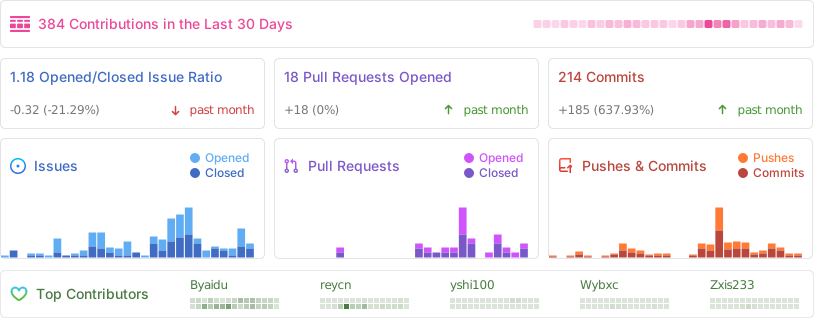
![Alt](https://repobeats.axiom.co/api/embed/dfa7583da5332a11468d686fbd29b92320a6a869.svg "Repobeats analytics image")

Star History

Star History Chart